Truthfully, unless you’re replacing your car’s port or something, the OBD2 protocol that’s used by your vehicle doesn’t matter. Modern OBD-II scan tools can interface with vehicles with any implementation of the standard. As long as you’ve got an OBD2 scan tool and a car produced after 1996, you should be able to connect the two regardless of make, model, or specific protocol. This article will show you all the details about the OBD2 protocol that is supported by your vehicle.
You can determine your vehicle’s protocol by examining the OBD2 connector’s pin.
Table of Contents
1 Which OBD2 Protocol Is Supported By My Vehicle?
2 How To Determine My Vehicle’s Protocol?
3 Where Is The Connector Located?
Which OBD2 Protocol Is Supported By My Vehicle?
The chart below shows the OBD2 protocols supported by vehicles so far (by examining connector pins).
SEARCH your OBD2 Protocols by Manufacturer below.
Make
OBDII Protocols
Alfa Romeo2005 : KWP2000 Fast
2008-2009 : CAN
Aston Martin2005-2009 : CANAudi1996-2001 : ISO 9141
2002-2004 : ISO 9141 , KWP2000
2005-2006 : ISO 9141, KWP2000, CAN
2007 : ISO 9141, KWP2000 Slow, CAN
2008-2009 : CAN
Bentley1996-2003 : ISO 9141
2004 : ISO 9141 (50%), KWP2000 (50%)
2005 : ISO 9141 (35%), KWP2000 (65%)
2006 : ISO 9141 (20%), KWP2000 (80%)
2007-2009 : CANBMW1996-2001 : ISO 9141/2
2002-2006 : ISO 9141/2, KWP2000
2007-2009 : ISO 9141/2, KWP2000, CAN
Chrysler1996-1997 : ISO 9141-2
1998 : ISO 9141-2 (95%), J1850-10.4 (5%)
1999 : ISO 9141-2 (85%), J1850-10.4 (15%)
2000 : ISO 9141-2 (75%), J1850-10.4 (25%)
2001 : ISO 9141-2 (35%), J1850-10.4 (65%)
2002 : ISO 9141-2(15%), J1850-10.4 (85%)
2003 : ISO 9141-2 (5%), J1850-10.4 (95%)
2004 : CAN (5%), J1850-10.4 (95%)
2005 : CAN (15%), J1850-10.4 (85%)
2006 : CAN (35%), J1850-10.4 (65%)
2007 : CAN (85%), J1850-10.4 (15%)
2008-2009 : CAN Corvette2006-2009 : CANFerrari2002-2003 : ISO 9141/2
2004-2005 : CAN, ISO 9141/2
2006-2008 : CANFiat2002-2006 : KWP2000 Fast
2007-2009 : CAN, KWP2000 FastFord2003 : J1850-41.6, CAN(5%)
2004 : J1850-41.6, CAN(50%)
2005 : J1850-41.6, CAN(85%)
2006 : J1850-41.6, CAN(90%)
2007-2009 : CAN GM Group1996 : J8501 -10.4, ISO 9141
1997-2002 : J1850-10.4, ISO 9141, KWP2000
2003 : J1850-10.4, ISO 9141, KWP2000, CAN
2004 : J1850-10.4(80%), CAN(15%), KWP2000(5%)
2005 : J1850-10.4(55%), CAN(40%) , KWP2000(5%)
2006-2007 : J1850-10.4(25%), CAN(70%), KWP2000(5%)
2008-2009 : CAN
Honda/Acura1996-2001 : ISO 9141
2002 : ISO 9141/2
2003 : ISO 9141
2004 : ISO 9141/2
2005 : ISO 9141
2006 : ISO 9141(70%), CAN(30%)
2007 : ISO 9141/2(40%), CAN(60%)
2008-2009 : CAN Hyundai1996-1998 : ISO 9141
1999 : KWP2000
2000-2007 : ISO 9141, KWP2000
2008-2009 : CANJaguar1996-2006 : ISO 9141
2007-2009 : CAN KIA1996-2000 : ISO 9141
2001-2005 : ISO 9141, KWP2000 Lancia2002-2006 : KWP2000 Fast
2007-2009 : CAN, KWP2000 Fast
Land Rover
1996-2001 : ISO 9141
2002-2004 : ISO 9141, CAN
2005-2009 : CAN
Lexus1997-1999 : J1850-10.4, ISO 9141
2000-2003 : ISO 9141
2004-2006 : ISO 9141, CAN
2007-2009 : CAN Lotus1996-2000 : No OBDII
2001 : ISO 9141/1
2002 : ISO 9141/0
2003 : ISO 9141/1
2004-2005 : ISO 9141/2
2006-2007 : ISO 9141/2, KWP2000 Fast
2008-2009 : CAN, KWP2000 Fast
Maserati2007-2009 : CANMazda1996-2002 : ISO 9141
2003 : IS0 9141(75%), CAN(25%)
2004-2005 : CAN(60%), ISO 9141(40%)
2006-2009 : CAN
Mercedes1996-1999 : ISO 9141
2000-2002 : ISO 9141, KWP2000
2003-2004 : KWP2000
2005-2007 : KWP2000, CAN
2008-2009 : CANMini2003-2005 : ISO 9141/2
2006-2007 : ISO 9141/2, CAN
2008-2009 : CAN Mitsubishi2000-2005 : ISO 9141
2006-2009 : CANOpel/Vauxhall2003-2006 : KWP2000 FastPorsche1996-2003 : ISO 9141
2004-2006 : ISO 9141/2
2007-2009 : ISO 9141/2, CANRenault2000 : ISO 9141/2
2008-2009 : CANRolls Royce1996-2003 : ISO 9141
2004-2006 : KWP 2000
2007 : CAN, KWP2000
2008-2009 : CANSaab2003-2009 : CANSeat2002-2003 : ISO 9141, KWP2000
2004 : ISO 9141, KWP2000 Slow
2005-2007 : ISO 9141/2, KWP2000 Slow, CAN
2008 : CAN, KWP2000 Slow
2009 : CAN
Skoda2002-2003 : ISO 9141, KWP2000
2004 : ISO 9141, KWP2000 Slow
2005 : ISO 9141/2, KWP2000, CAN
2006-2007 : ISO 9141/2, KWP2000 Slow, CAN
2008 : CAN, KWP2000 Slow
2009 : CAN
Subaru1996-2002 : ISO 9141
2003-2004 : ISO 9141, KWP2000
2005 : KWP 2000
2006-2009 : CANSuzuki1996-2000 : ISO 9141
2001-2006 : ISO 9141, KWP2000
2007-2009: CAN Toyota1997-1999 : J1850-10.4, ISO9141
2000-2003 : ISO 9141
2004-2007 : ISO 9141, CAN
2008-2009 : CAN Volkswagen1996-2001 : ISO 9141
2002-2003 : ISO 9141, KWP2000
2004 : ISO 9141, KWP2000 Slow
2005-2007 : ISO 9141/2, KWP2000 Slow, CAN
2008-2009 : CAN Volvo1996-2003 : ISO 9141
2004 : ISO 9141(90%), CAN(10%)
2005 : ISO 9141(5%), CAN(95%)
2006-2009 : CAN
*Pin 15 is a must-have on vehicles that use protocols ISO 9141 or ISO 14230
Let’s find out more about the types of OBDII protocols!!
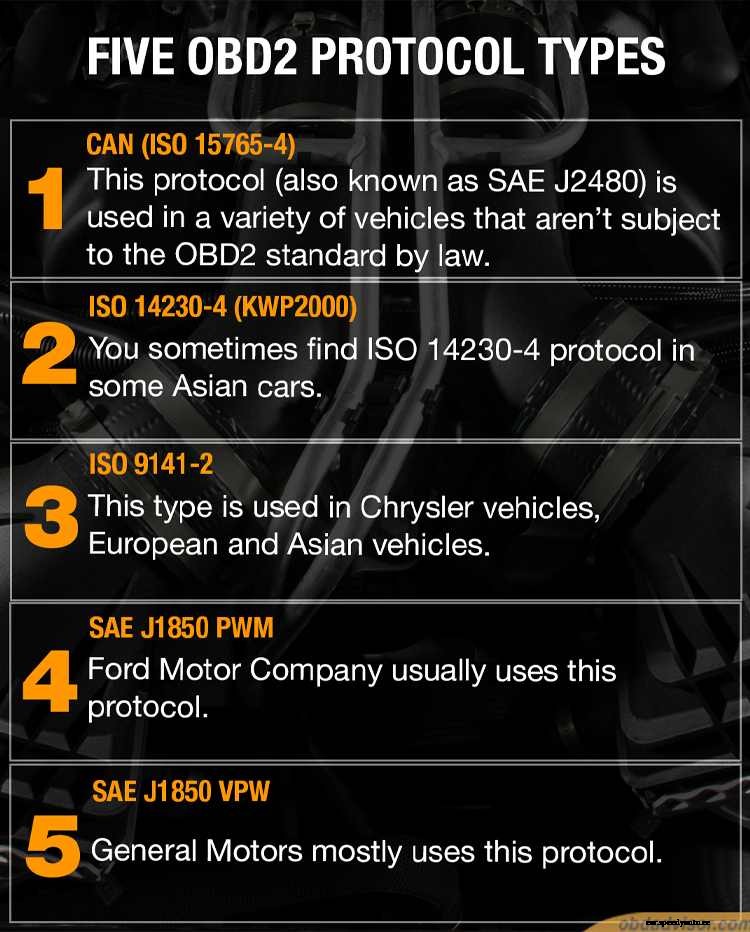
Think of protocols like the accent that your car has when it talks to your scan tool. Your scan tool can still understand cars with different accents, but how various cars “talk” might sound a little bit different. Below come the details of five OBD2 protocol types:
These are types of OBD2 protocols by vehicle make and model
CAN (ISO 15765-4)
This protocol (also known as SAE J2480) is used in a variety of vehicles that aren’t subject to the OBD2 standard by law. Pins 6 and 14 should be there, while the metallic contacts should have pins 4, 5, and 14. This variant is used in most newer cars since newer car computers need the unique features this protocol offers to communicate effectively.
ISO 14230-4 (KWP2000) And ISO 9141-2
Pin 7 is a must. The connector must also have material contacts inside pins 4, 5, and 16. You sometimes find ISO 14230-4 protocol in some Asian cars, while ISO 9141-2 is used in Chrysler vehicles, European and Asian vehicles. (Please note that pin 15 is a must for old cars with ISO 14230 or ISO 9141.)
SAE J1850 PWM
If the connector has pin 2 and pin 10, the protocol is SAE J1850 PWM. The connector should also have metallic contacts inside pins 4, 5, and 16. Ford Motor Company usually uses this protocol.
SAE J1850 VPW
Pin 2 is a must. The connector must also have material contacts inside pins 4, 5, and 16. However, pin 10 should not be there. General Motors mostly uses this protocol.
How To Determine My Vehicle’s Protocol?
There are two typical ways to find what protocol is supported by a vehicle:
(1) – Use the OBD2 protocols list suggested by manufacturers;
(2) – Examine the OBD2 connector pins.
Let’s go and see how to do it!!
Examine The Connector Pins
The second way is to identify which protocol your vehicle is supported by having a look at the pin-out of the OBD2 connector. Each protocol uses a different pin to communicate with a scan tool. By carefully examining the inside of the “teeth” on the serial bus, you can figure out which pins are in use and which sockets are left empty. This enables you to figure out the protocol that your car uses. Again, though, your scan tool has a receptacle for every protocol. It does not matter what your vehicle uses unless you’re doing something complicated (like replacing your connector). All cars produced after 2008 have more advanced computers that require the CAN protocol and will have similar pin configurations (4, 5, 6, 15, 16). Cars produced before 1998 have a bit more variance with which pins are used.
While most scan tools can plug into both Type A and Type B connectors, there’s a slight physical difference between the two types of ports. Type A connectors have 16 “teeth” in two rows of 8 sandwiching a single “tongue,” while Type B connectors have the same 16 “teeth” sandwiching a “tongue” that’s split in two. Again, your scan tool can probably plug into both types of connectors without any problems.
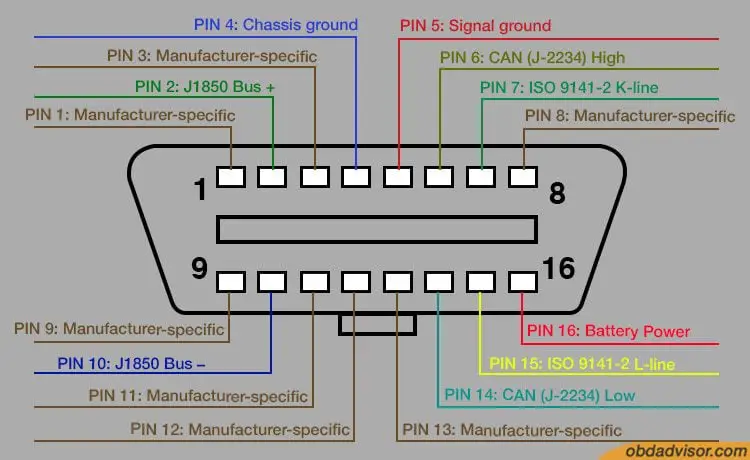
Suppose we number the top 8 pins 1-8 from left to right and number the bottom 8 pins as 9-16 from left to right. Here’s what each pin is used for:
OBD2 port pinout
Top Pins:
Pin 1: Reserved for OEM COMM
Pin 2: This is where your J1850 Bus+ is
Pin 3: OEM Reserved
Pin 4: This is just a car chassis ground
Pin 5: Similarly, this pin holds a sensor signal ground
Pin 6: OEM COMM. Here’s your CAN high pin (J-2284). Most modern cars (2008+) will have this pin and a set of other pins, including pins 4, 5, 6, 15, and 16.
Pin 7: This is your ISO 9141-2 K line
Pin 8: OEM Reserved
Bottom Pins:
Pin 9: OEM COMM
Pin 10: Here’s your J1850 Bus- (negative) (note the location relative to pin 2)
Pin 11, 12, 13, 14 OEM Reserved
Pin 15: ISO 9141-2 L-line. This is right below the matching K_line.
Pin 16: Unswitched Battery Power. This powers your scan tool.
Where Is The Connector Located?
If the connector has pin 2 and pin 10, the protocol is J1850 PWM.
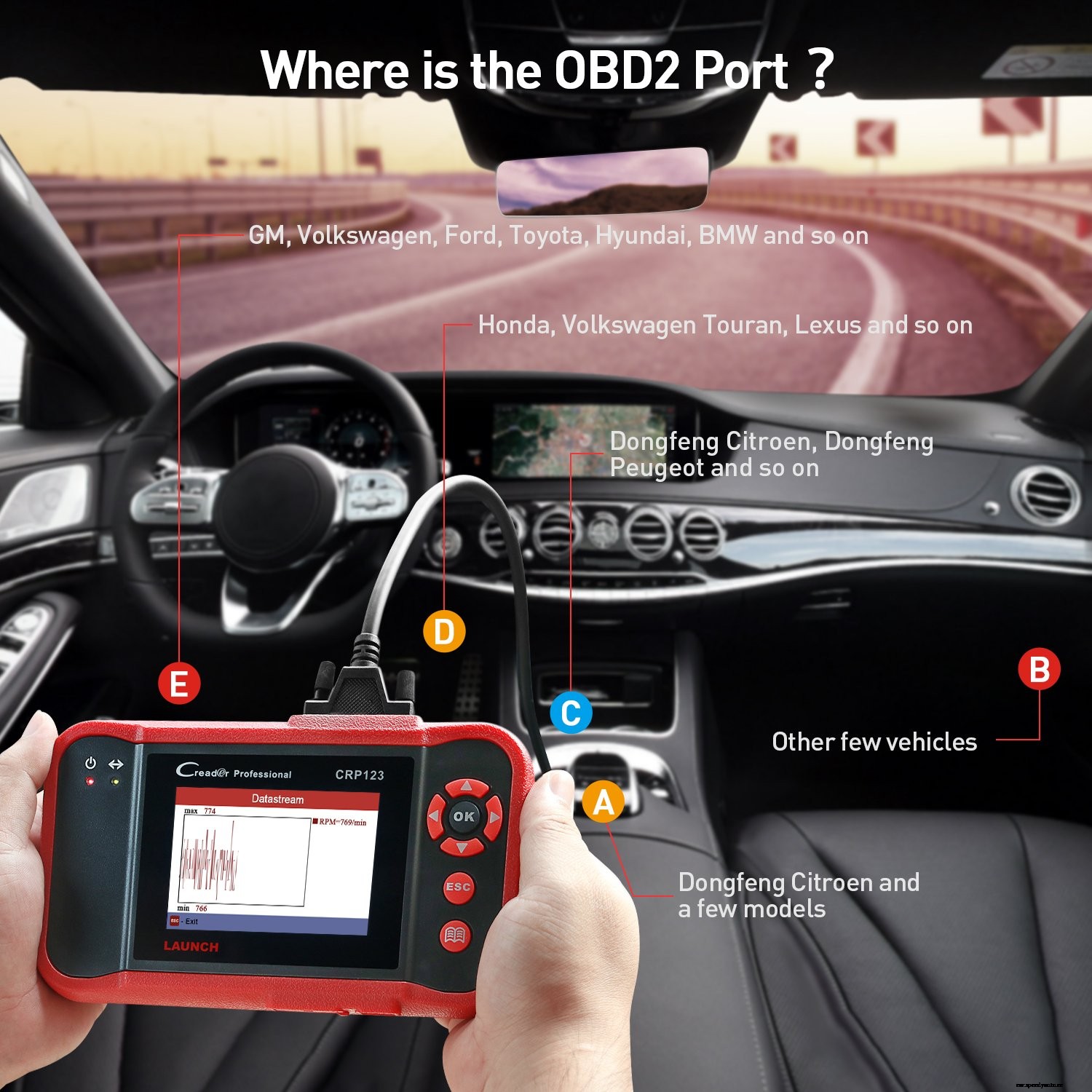
OBD-II connectors have to be located on the driver’s side of the car or within a couple of feet of the car’s centerline. They have to be accessible from either the driver’s seat or the front passenger’s seat. They’re usually under the steering column. Less frequently, they’re sometimes under the glove compartment. If you can’t easily find the connector, you can use your favorite search engine to find out exactly where it’s located in your particular vehicle. Be sure to include the make, model, and year in your search. While there are a couple of subtypes of OBD2 systems, there’s no practical difference between where the connector is located. The standard has shifted slightly over time, but most connectors are still found below the steering column.