

8 minute read|20th Feb 2026
Android Auto is one of many great features modern car infotainment systems allow you to access.
It effectively mirrors your Android smartphone's menu screen and allows you to access many of its apps and features safely and legally through your in-car tech.
From navigation apps to music and media streaming, there are many great advantages to using Android Auto.
This in-depth guide tells you all you need to know about Android Auto, including how to connect to it, key features, and any disadvantages to using it. We'll also help you troubleshoot any Android Auto errors.
Android Auto is a Google-developed mobile application described as a "hands-free, smart driving companion". It connects your Android-powered smartphone or tablet to a compatible car infotainment system.
More advanced than connectivity like Bluetooth phone pairing, Android Auto displays a simplified, driver-friendly version of your Android phone's screen. It also allows you to access key apps and features from behind the wheel.
Much like Apple CarPlay for Apple devices, it is designed to be a safer way for drivers to use navigation or streaming – as well as making hands-free calls and messages while behind the wheel.
This guide looks at how to install and use the app – plus any questions you may have.


RAC sale – up to 25% off*
Buy now
Android Auto works by connecting your smartphone to your car's infotainment system – as long as the vehicle is compatible with the app.
The app connects to the on-board infotainment system through a USB cable, or wirelessly over Bluetooth where available, meaning a driver can use apps and call people hands free.
This means it is safer for the driver and takes away unnecessary distractions – keeping their focus on the road in front of them.
Android Auto was first launched in 2015, so you'll need a car newer than that to make it work. You'll also need to make sure your phone is running newer versions of its operating system (called Android OS).
Phones running Android 10 and onwards will have Android Auto built in. Phones running Android 9 may be able to support it if downloadable in the App Store.
Users connecting to microphone-equipped cars will find that Android Auto can also use voice commands to perform various tasks. Drivers can connect to the app by simply asking ‘Hey Google’ or ‘OK Google’. From here you can dictate what you want to the app to do.
In some vehicles, there are also dedicated buttons on either the steering wheel or touchscreen.
From here drivers can make calls, send messages (after dictating them via voice), get directions and control music without taking your hands off the wheel.
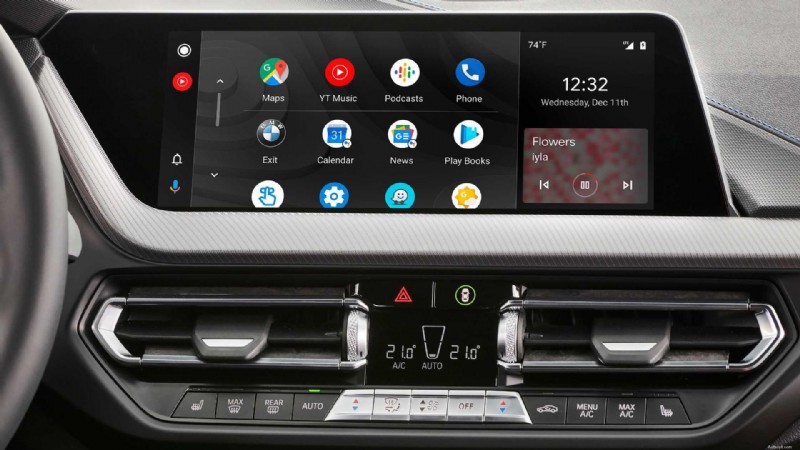
For drivers with an Android device who are looking to use the app, then there are few steps to take to get you set up.
When you use the app for the first time when connected to your vehicle you will need to grant certain permissions – however, once this is done, you are all good to use Android Auto.
For newer phones, you do not need to download Android Auto – it is pre-installed to all devices.
RAC Mobile Mechanics come to you
RAC Mobile Mechanics are rated EXCELLENT and 5 stars on Trustpilot.
Book now
Android Auto provides are several advantages for drivers:
Android Auto, along with most of its apps, are free to use. However, some may require in-app purchase to unlock features, and streaming services such as Spotify can require monthly subscriptions to avoid adverts.
Much like Apple users, Apple CarPlay, Android Auto has a variety of compatible apps you can use with their software.
There are also a series of third-party apps that drivers can also use including your calendars, notes, and parking apps.
You will need to check if they are compatible with Android Auto. You will find this information on the apps page on the Google Play Store.
If you are currently sitting in your vehicle, wondering why Android Auto isn’t connecting – here are the steps you need to take.
Before you panic, check that you have the latest version of Android downloaded. In newer phones, the latest update will cover many issues relating to Android apps.
Visit the Play Store and make sure you have the latest version.
In some cases, your vehicle’s infotainment system may also need an update. This can be done on the settings page, or by turning the engine on and off.
After this, check your USB or wireless connection. Some phones will need WIFI activated for it to work.
If Android Auto is still not working, you might not have a compatible vehicle.
Google Support has a community forum page that covers specific issues relating to certain makes and models of vehicles. If you are still not able to connect, the best thing to do is visit that website.
The final thing to do – according to Google – is to take the following steps.
If you're having trouble connecting, unplug or disconnect your phone from the car.
Next, select Menu, then Settings, Connected devices, Connection preferences, Android Auto, and then Previously connected cars. Tap on top right menu and then Forget all cars.
After this, try to reconnect to the vehicle.
It is very easy to turn off Android Auto from connecting to your vehicle, although you might find simply turning off the connection won't immediately work.
Generally, you'll need to go to your car's settings, click on the apps section, and then scroll to the Android Auto app.
Click on it, and then tap the disable button.
To turn it on, simply repeat the process and enable Android Auto.
Android Auto is readily available in almost every new car on sale today, and has been available in certain models since 2015.
Almost every major brand from Alfa Romeo to Volvo offers Android Auto connectivity in their cars. Most of the latest models allow you to connect wirelessly via Bluetooth or WiFi.
However, a few key new automotive brands, such as Tesla and Rivian, have never offered Android Auto in any of their cars. General Motors is phasing it out and intends to use its own system. Some early Polestar models didn't support it, either, but now do.
Yes, it is possible to upgrade a non-compatible car to make it work with Android Auto. However, it can require changing your car's screen or installing a new head unit.
The best systems are designed to fit in place of your car's existing touchscreen (if it has one). These usually need to be fitted professionally, however, and can cost hundreds of pounds.
Some of the cheapest Android Auto compatible devices can be had from little more than £50. These are screens that you mount to the dashboard or windscreen and connect to your car's 12-volt power outlet and it's Bluetooth system. These are more basic systems that can require draping unsightly wires over your dashboard, but they'll still support all key Android Auto features.
Despite the very similar names, Android Auto and Android Automotive are actually different things entirely.
Android Automotive OS, sometimes called Android Car OS, is a standalone, open source in-car operating system used in certain cars. It doesn't require a smartphone to work.
Android Automotive is used by many car companies which preferred buying in to a technology company's system rather than developing their own in-car user interface.
Loads of brands use Android Automotive in their cars in 2026. Just some of the brands using Android OS (with or without Google Automotive Services) include:
In 2025, Android Auto underwent its most significant transformation yet, with Gemini AI replacing Google Assistant and new multimedia features enhancing the in-car experience for drivers.
This smarter, more conversational assistant can handle complex queries, manage messages, and can stop navigation routes with back-and-forth dialogue.
This shift marked a major leap in usability, making Android Auto feel more proactive and intuitive.
Google also enabled official video playback in parked mode for Android Auto users, allowing apps like YouTube to be used when the vehicle is stationary.
Some key disadvantages to using Android Auto in your car include:
RAC sale – up to 25% off*
Buy now

Book a car service today
It’s easy to book a service online at one of our local approved garages.
Find a trusted local garage with the RAC stamp of approval.
Book a service
