
Tesla’s app is one of the most advanced car apps on the market. It lets you control everything from the heated seats to the summon feature. But what does the start button in the Tesla app do?
The start button in the Tesla app allows you to start your car remotely. You can use the start button without your access card or key. You can use the start button to enable your family members and friends to enter the car. It’s also useful if your friend wants to borrow your Tesla for one ride.
This article will go over the Tesla start button, its use, the different methods of starting a Tesla, and more. I’ll also give you a brief comparison of the various apps available for your new Tesla.
The start button on the Tesla app is a button that lets you start the car remotely. It’s a useful alternative to having the key or access card with you. You can use it to start the car for someone else, too, without even being near the vehicle.
Before the 4.0 Tesla app update, you would have had to authenticate the command. You’d either need to type in your pin or use biometric data (such as your fingerprint) to start the car.
The 4.0 update was released for iOS and Android in 2021, so this process is no longer needed, which means you should make sure to update your Tesla app if you haven’t already. (Here’s how the Tesla mobile app V4.0 is different than the old version)
The start button is somewhat confusing because it’s an electric motor. It’s more useful for gasoline engines.
You can use the start button to fire an engine up and allow it to warm up before you drive.
Nonetheless, it’s a feature some couldn’t live without. You can use the start button to allow somebody else to drive the car.
It’s more convenient than valet mode because it won’t change any of your settings.
Valet mode severely restricts the features available in your Tesla, which can be a downside for friends who borrow your car for a single ride.
We wrote a helpful article about Tesla Valet Mode and everything there is to know about it. Check it out! We found some interesting hacks.
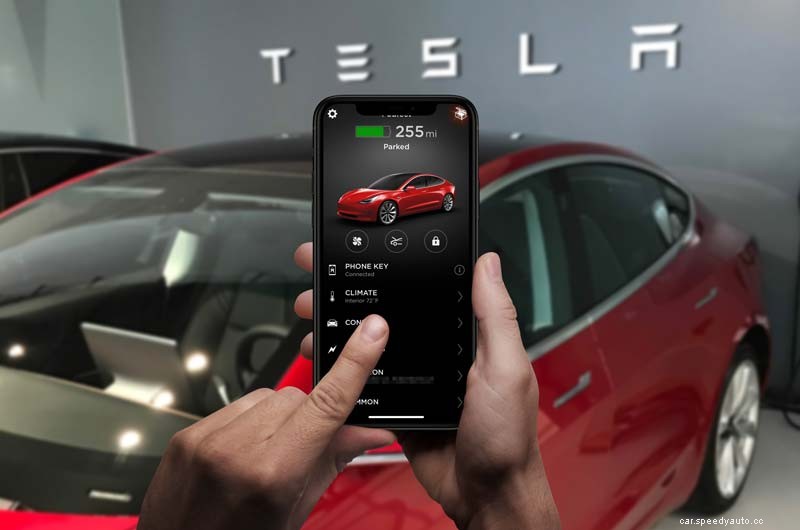
The Tesla start button can be used to turn the car on remotely. It allows you to use your phone as a key. Also, you can use the start button to start the engine from wherever you are. If someone wants to drive your car, you can use the button to give the person temporary access.
The coolest thing about the Tesla start button is that it works wherever you are.
Imagine you were on holiday in Europe, but an airport employee wants to move your car because it’s in someone’s way. You could start the car from thousands of miles away.
Of course, you’ll mostly be using the start button to engage your engine when you don’t have the key with you.
Pro Tip:
A way to delete favorites right from the screen. When your screen is up 3/4 from your radio (you have your favorites listed below) on your save radio station. If you press and hold you get a little “x” on each one and you can easily remove those.
You start the Tesla phone app by downloading and installing it on your phone. Next, create a Tesla account, sign in on your Tesla, add all required documentation, and wait for the VIN to transfer. Once transferred, you can use the Tesla app to control your vehicle.
Setting up a Tesla if you bought it second-hand takes some time. Creating and signing into your Tesla account is the easy part. It’s pretty self-explanatory.
The tricky part is all the documentation you need. You have to fill in the form with the following:
Some VIN numbers can be transferred hassle-free. It’ll happen automatically, and you can use the app. Other times, you must contact the previous owner and ask them to accept the request.
You can start your Tesla with your phone. If you have previously set up your account on the Tesla app, you don’t need to have the key with you. Simply open the Tesla app, go to Controls, and press the Start button. After authentication (on older app versions), the car will stay on for 2 minutes.
It’s fascinating to see how far we have gotten with technology. You can start your Tesla with your phone even if you’re on a different continent.
All you need is access to the Internet and the feature justworks. If you showed this to people 20 years ago, they’d probably think you’re a magician.
If your Tesla app is still on version 3 or older, you need to type in a password or use your fingerprint to authenticate the Start request.
Since that was inconvenient and mostly unnecessary, Tesla removed the authentication request in the 4.0 app. It makes starting the car remotely more convenient.
When you press the start button, a 2-minute timer starts counting down. If you don’t drive off after 2 minutes have passed, the car will turn off.
You can start your Tesla remotely through the Tesla app. Open the app, go to Controls, and tap on the Start button. This will start the engine remotely for two minutes. If nobody starts driving the car within the time window, it’ll turn off. You can turn it on again using the same method.
It’s a cool feature because you can let someone drive your car without giving them a key or anything. However, remote starting your Tesla isn’t really necessary.
That’s because Teslas are always on. The engines don’t need to warm up in winter like gasoline engines do. You just get in and drive.
Tesla creating an app for their car is one of the coolest innovations of the twenty-first century. It shows how far we’ve gone from steam cars and horse carriages.
Other car manufacturers like BMW and Audi have caught up with Tesla over the past couple of years. Their apps let you start the engine remotely too. But we all know who gave birth to the idea.
A Tesla isn’t a push-to-start car. Instead, you start the vehicle by pushing the brake pedal and putting it into drive or reverse. If you’re using a key card, you will need to put it on the console first. You can also use the Tesla app on your phone to start the car.
Even budget-friendly cars have adopted the cool sports car red start/stop engine button. It makes you feel as if you were starting a jet engine.
But Tesla is a whole step ahead of its competition. You can use your phone as a key by enabling the phone key mode in the Tesla app.
When you have it set up, your car will unlock automatically as you approach it. Note that you must have Bluetooth on for this to work.
You don’t have to take your phone out of your pocket at any point. Of course, you can if the feature fails you.
Once you’re in the car, pressing the brake will let the car know that you’re ready to go. You then shift into gear using the stalk.
The new Tesla Model S will detect what gear you need automatically. However, you can override it through the touchscreen.
Pairing your Tesla app with the car is essential to get all the cool remote features. It’ll also allow you to use the phone as a key.
Moreover, some features are only available through the app, such as the remote start button.
This is how you pair the Tesla app with your car via Bluetooth:
Once you pair the Tesla app with your car, learning its quirks and features will take forever.
There are few explanations within the app itself. Some menu options are especially confusing. For example, turning the heated or ventilated seats is tricky when you do it the first time.
Moreover, the 4.0 app update has moved some actions elsewhere. So, instead of digging through the whole app bit by bit, watch this excellent walkthrough video:
