
🛠️ About to spend $25–$900 on a scanner? Our $7 Buyer's Shortcut breaks down 18 scanners across 3 budget tiers, names the ones to avoid (FIXD subscription trap, fake bidirectional claims, ELM327 clones), and settles 3 of the biggest head-to-heads. No affiliate fluff. Get the Shortcut ($7) →
Disclosure: Some links in this article are affiliate links. This does not affect our review process or product rankings.
Don't waste money on the wrong tool. See which scanner features you actually need for your specific car.
The MOTOPOWER MP69033 and MP69040 look almost identical in Amazon listings, and both promise the same core OBD2 functions — read codes, clear codes, live data, I/M readiness. At $19 vs ~$33, the price gap seems small, but which one actually gives you more for that extra money? Pick wrong and you’re either overpaying for features you won’t use or stuck with a screen you can barely read in sunlight.
The MOTOPOWER MP69040 is the better buy for most people. For roughly $15 more, you get a color TFT screen, a 10x larger DTC database (100,000+ vs 10,000), built-in battery voltage testing, QR cloud print for sharing reports, USB-C updates, and an extra year of warranty. The MP69033 only wins if your sole priority is spending as little as possible on a working code reader.
⏱️ Short on Time?
Get the MP69040. The color screen alone makes reading codes in a dark engine bay dramatically easier, and the 10x larger DTC database means fewer “definition not found” dead ends. The built-in battery test and QR cloud print are bonuses that justify the ~$15 difference. The MP69033 is fine if you just want the cheapest possible code reader that works.
Check MP69040 Price at Amazon →
Check MP69033 Price at Amazon →
Both scanners come from the same manufacturer and share the same core OBD2 functions. The differences are what make the MP69040 worth the price bump for most buyers.
This is the most immediately noticeable upgrade. The MP69033 uses a small monochrome 128×64 LCD with a white backlight — functional but hard to read in direct sunlight or a dim garage. The MP69040 jumps to a 2.8-inch color TFT display that makes live data, freeze frame values, and DTC descriptions significantly easier to parse at a glance.
For quick code reads in a parking lot, either screen works. But if you’re scrolling through live data streams or trying to read a long DTC definition, the color TFT makes a real difference in usability.
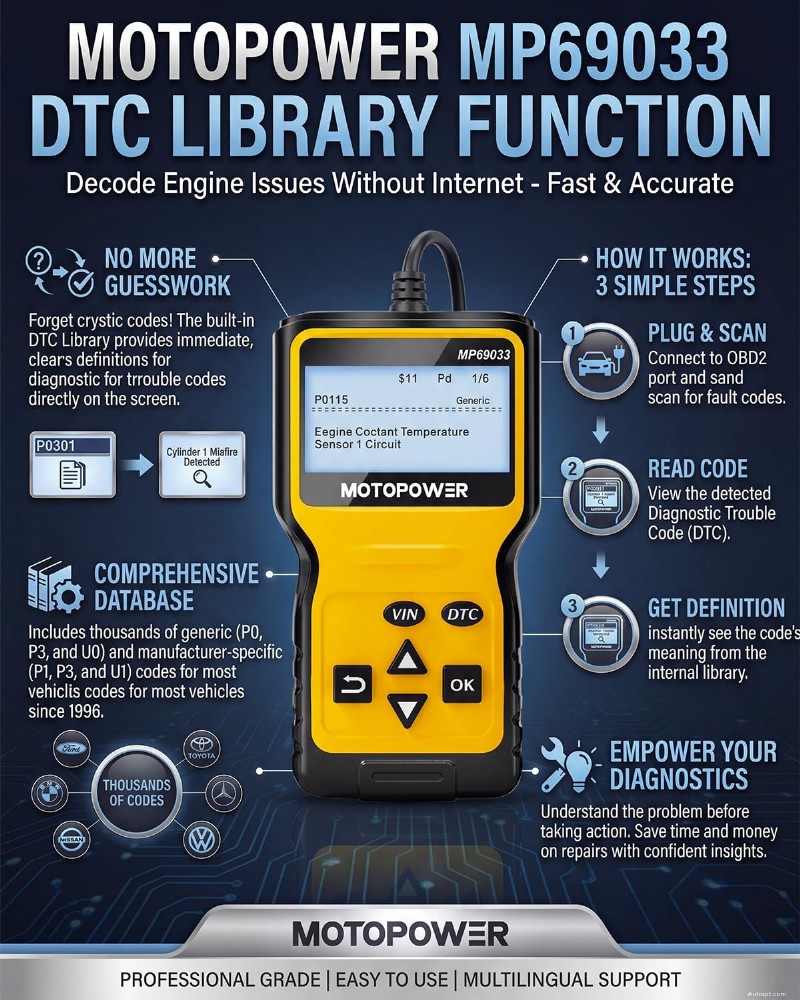
The MP69033 ships with approximately 10,000 DTC definitions. That covers most generic (P0xxx) powertrain codes, but manufacturer-specific codes often come back as just a code number with no description. The MP69040 expands this to over 100,000 definitions — a 10x increase that covers far more manufacturer-specific codes.
This matters because when your check engine light comes on and the scanner returns “P1456,” you want to know that means “EVAP system leak detected (fuel tank system)” — not just a raw code number you have to Google. The larger database on the MP69040 means fewer trips to your phone mid-diagnosis. For context on what these codes mean and how they break down by manufacturer, see our OBD2 code guides.
The MP69040 includes a built-in battery voltage test that reads your vehicle’s battery level through the OBD2 port. The MP69033 does not have this feature at all. While it’s not a full battery health analyzer, it’s a quick way to check if a weak battery is contributing to starting issues or intermittent electrical codes — without needing a separate multimeter.
The MP69040 can generate a QR code on its screen that you scan with your phone to view a full diagnostic report in your mobile browser. This is MOTOPOWER’s workaround for not having Bluetooth or app connectivity — you can save the report, text it to your mechanic, or keep it as a pre-purchase record. The MP69033 has no way to share or export data at all; whatever’s on the screen stays on the screen.
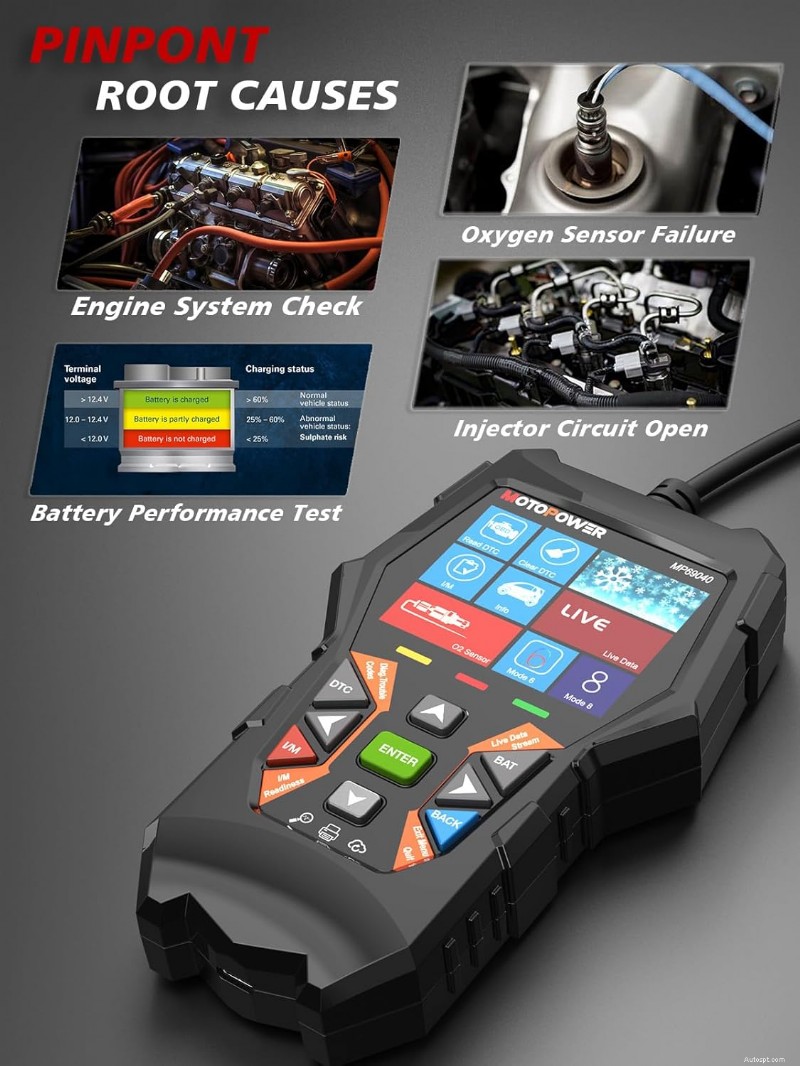
The MP69033 uses Micro-USB for firmware updates. The MP69040 upgrades to USB-C — a small but welcome change since Micro-USB cables are increasingly hard to find. The MP69040 also adds a dedicated LDS (Live Data Stream) button (9 buttons total vs 6 on the MP69033), making it faster to jump into live data without menu-diving.
MOTOPOWER claims the MP69040 uses a “6x faster industrial chip.” Based on manufacturer specs, this should reduce scan initialization times and make scrolling through live data smoother, though both units are plug-and-play powered through the OBD2 port with no separate battery needed.
The MP69040 extends the warranty from 2 years to 3 years and adds 4 more languages (10 total vs 6). Neither difference is a dealbreaker, but the extra warranty year is a nice bonus on a budget tool.
Both the MP69033 and MP69040 cover the same core OBD2 diagnostic functions: read and clear trouble codes, live data stream, freeze frame, I/M readiness (emissions check), VIN read, O2 sensor test, and EVAP system test. Both support all 9 OBD2 protocols and work on any 1996+ OBD2-compliant vehicle (gas and diesel, domestic and import).
Important limitations both share: These are engine-only code readers. Neither supports ABS, SRS (airbag), or transmission codes. Neither has Bluetooth or app connectivity. Both are Windows-only for firmware updates (no Mac support). And per the manufacturer, neither is recommended for hybrid or electric vehicles. Both include lifetime free updates.
If you need ABS or SRS coverage, you’re looking at a different class of scanner entirely — check the Foxwell NT301 review or our MOTOPOWER MP69033 vs Foxwell NT201 vs NT301 comparison for step-up options.
Prices verified April 2026. Update during article refreshes.
Both the MP69033 and MP69040 work on any 1996 or newer OBD2-compliant vehicle sold in the United States — that includes domestic (Ford, GM, Chrysler), Asian (Toyota, Honda, Nissan, Hyundai, Kia, Subaru), and European (BMW, VW, Mercedes, Audi) makes. Both support all 9 OBD2 protocols (CAN, J1850 PWM, J1850 VPW, ISO 9141, ISO 14230 KWP).
The key limitation: these are generic OBD2 code readers, not manufacturer-specific diagnostic tools. They read engine-related powertrain codes only. You won’t get ABS, SRS, transmission, or body codes from either unit. And MOTOPOWER explicitly states neither scanner is recommended for hybrid or electric vehicles.
Both scanners use the same basic form factor — a handheld unit with an attached OBD2 cable. No batteries needed; they draw power directly from the vehicle’s OBD2 port. Both are plug-and-play with no app installation or account creation required.
The MP69040 is noticeably more polished in hand based on the spec sheet: the larger color screen, USB-C port, and additional navigation buttons (including the dedicated LDS shortcut) make it feel like a generation ahead of the MP69033. Both units support firmware updates, but only through a Windows PC — Mac users are out of luck on both models.
Neither scanner has subscriptions, hidden fees, or paid tiers. Both include lifetime free firmware updates via their respective USB connections. The only cost is the one-time purchase price — making the ~$14 gap between them the entire decision.
Check MP69040 Price at Amazon →
Check MP69033 Price at Amazon →
Which One Should You Buy?
Buy the MP69040 if… you want the best budget code reader under $35. The color screen, 100,000+ DTC database, battery voltage test, QR cloud print, and USB-C are genuine upgrades that make diagnosing easier — especially if you plan to use the scanner more than once or twice a year.
Check MP69040 Price →
Buy the MP69033 if… you want the absolute cheapest working OBD2 code reader for occasional check engine light checks. It reads and clears codes, shows live data, and does I/M readiness — the basics. At ~$19, it’s hard to beat on pure price alone.
Check MP69033 Price →
Both scanners are made by MOTOPOWER INC and include lifetime free firmware updates downloaded from the MOTOPOWER website (Windows only). The MP69033 comes with a 2-year warranty; the MP69040 extends that to 3 years. MOTOPOWER provides email-based customer support. Both units ship with a user manual, OBD2 cable (permanently attached), and a carrying case.
MOTOPOWER MP69033 vs Foxwell NT201 vs NT301 — How the MP69033 stacks up against Foxwell’s budget code readers.
Foxwell NT301 Review — A step-up code reader if you need more than basic engine codes.
ANCEL AD210 vs AD310 vs AD410 — Another budget code reader lineup comparison.
How to Choose an OBD2 Scanner — Buying guide to help you decide what level of scanner you actually need.
Best OBD2 Scanners (2026) — Our full scanner roundup across all price ranges.
No. Both are engine-only OBD2 code readers. They read powertrain (P-codes) and some emissions-related codes, but neither can access ABS, SRS, transmission, or body control modules. For ABS/SRS coverage, you’ll need a scanner like the Foxwell NT301 or higher.
Yes, both work on any 1996+ OBD2-compliant diesel vehicle. They support all 9 OBD2 protocols including CAN. However, they only read generic OBD2 codes — not manufacturer-specific diesel systems like DPF regeneration or DEF level.
MOTOPOWER does not recommend either scanner for hybrid or electric vehicles. While they may physically connect and read some generic codes, they are not designed or validated for hybrid/EV powertrains.
No. Both scanners include lifetime free firmware and DTC database updates. Download them from MOTOPOWER’s website and install via USB. No subscription, no annual fees.
No. Both the MP69033 and MP69040 require a Windows PC for firmware updates. MOTOPOWER does not provide a Mac-compatible update tool for either model.
After running a diagnostic scan, the MP69040 displays a QR code on its screen. Scan it with your phone’s camera to open a diagnostic report in your mobile browser. You can then save, screenshot, or share the report — useful for texting results to a mechanic or keeping a pre-purchase vehicle record.
For most buyers, yes. The color screen, 10x larger DTC database, battery voltage test, and QR cloud print are meaningful upgrades for a ~$15 price difference. The MP69033 only makes sense if you want the absolute lowest-cost code reader and don’t mind a monochrome screen with limited DTC definitions.
🛠️ Before You Spend $25–$900 on a Scanner
No affiliate fluff. No "top 10" lists copied from Amazon. Just the honest breakdown of what to buy — and what to walk past.
28 pages · Technically reviewed by ASE-certified master technicians · Updated March 2026 · 30-day money back
